

Integrations / Shopify
Shopify analytics, AI insights, and alerts.
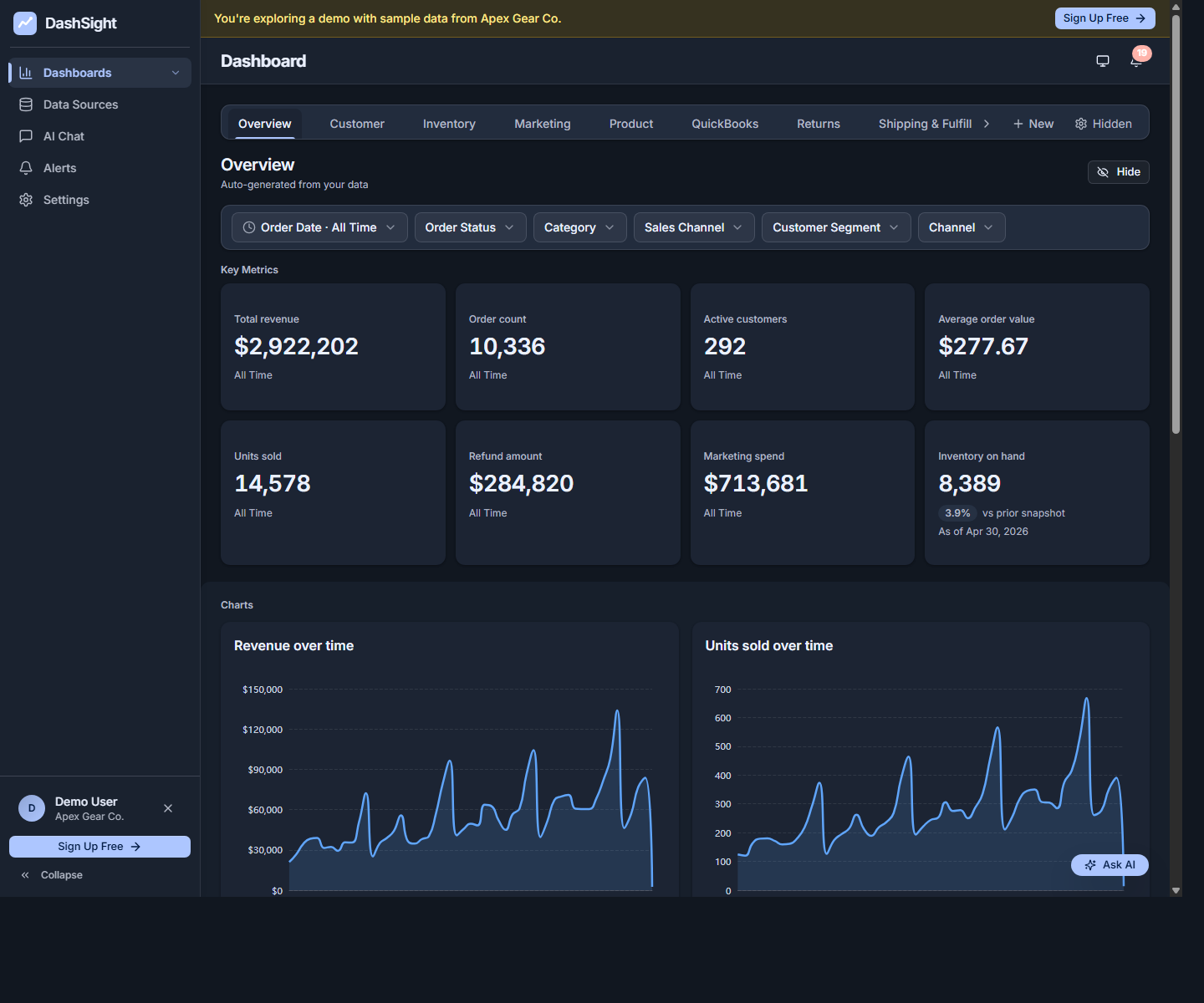
Connect Shopify to DashViz. Get an auto-generated dashboard tracking revenue, orders, AOV, customers, and product performance — and ask 'which products had the highest return rate last month?' in plain English.
14-day trial · No credit card required
Native Shopify is on the roadmap. Until then, export Shopify data to CSV or Excel and DashViz handles the rest.
What you get
- Auto-generated Shopify dashboard: revenue, orders, AOV, customers, repeat rate, top products, return rate.
- AI chat — ask 'which channel drove the most revenue last week?' or 'what was my best Tuesday this quarter?'
- Alerts on revenue drops, conversion anomalies, return rate spikes.
- Combine Shopify with Stripe (for non-Shopify revenue) or QuickBooks (for full P&L).
Setup in 3 steps
Connect your Shopify store
When the connector is available, click Connect Shopify in DashViz and authorize the read-only connection from your Shopify admin.
Confirm products and metrics
DashViz reads your products, orders, and customer data. Review the detected metrics.
Get your store dashboard
Your Shopify dashboard generates with revenue, AOV, customers, products, returns, and channel mix.
Metrics DashViz auto-detects from Shopify
- Total revenue, net revenue (after refunds)
- Orders, average order value (AOV)
- Customer count, repeat customer rate
- Top products by revenue, units sold
- Return rate by product and category
- Channel mix (online store vs. POS vs. social)
- Conversion rate (with traffic data)
When Shopify's built-in reporting is enough
Shopify Analytics covers the basics well. DashViz adds value when you want AI chat to drill into customer-level questions, want to combine Shopify with payments and accounting data, or want alerts watching for revenue or return-rate anomalies.
Common questions about Shopify + DashViz
Does DashViz read or modify my store?
Read-only via the Shopify Admin API. DashViz never modifies products, orders, or customers in Shopify.
What about multi-store setups?
Pro and Enterprise can support multiple native integration instances as the connector becomes available. Each store counts toward your data-source limit.
How does DashViz handle returns and refunds?
Returns are pulled from the Shopify orders API. Refund rate, return reason breakdown, and net revenue (gross minus refunds) are all standard widgets on the auto-generated dashboard.
Can I see metrics by channel (online vs. POS vs. social)?
Yes — DashViz surfaces channel mix automatically when your Shopify setup uses multiple sales channels.
Does DashViz pull product images or descriptions?
Product names yes (for grouping). Images and descriptions no — they are not needed for analytics.
Ready to explore Shopify analytics?
Start your 14-day free trial. No credit card required.